
Well, no one hooked me up with a ZumoDrive beta invitation the other night (sort of like nobody ever responds to any of my other @Twits, but that’s a topic for another day), but that’s OK because ZumoDrive opened to the public today, which means even lowly outsiders like me can use it. And use it I did.
Here’s my report and the reason why I prefer Dropbox.
Sign Up and Installation
Sign up is simple and, like Dropbox, involves the installation of a local application to mount the service as a virtual drive on your computer. Upon installation, ZumoDrive shows up as a removable storage device on your computer. Here it is, amid the extraneous and empty disks courtesy of my card reader.

The virtual drive looks and operates like any other hard drive on your computer. You can drag and drop files, add new folders and generally manipulate the virtual drive the same way you would with your local hard drives. ZumoDrive installs itself as the “Z” drive on your computer, which worked fine for me, but might be a problem if you already have a disk mapped to the “Z” letter. I saw a post in the ZumoDrive forums indicating that there may eventually be a way to change ZumoDrive’s drive letter. This should be a priority.
You can install the ZumoDrive application on as many computers as you want, and each computer can then access the files in the same manner, via Windows Explorer.
All of this works well. It’s similar to Dropbox, except that your storage space shows up as a virtual drive as opposed to a “Dropbox” folder in your Documents folder. ZumoDrive has the advantage here. It also has a slight edge in the web page design category, though so little of my activity will be through the web interface that this doesn’t really matter. So far, ZumoDrive works as advertised and is a very solid application, particularly for one that went public today.
Sharing
But there lurks a dark lining inside of every silver cloud.
Oddly enough in these social media/sharing crazed days, the ZumoDrive experience breaks down when you try to share your files. As a test, I uploaded an MP3 of one of my songs (“I Know Better Now”) to ZumoDrive and to Dropbox. It was an easy drag and drop experience in both cases. Next, I tried to share that file, so I could link to it, use it on my Blip.fm page, etc. With Dropbox, it was as simple as right clicking on the file right there in Windows Explorer and selecting Dropbox > Copy Public Link. The URL is copied onto your clipboard for easy use. Blipping the song on Blip.fm is as simple as pasting that same URL into the search box. Easy as pie.
When I tried to do the same thing with ZumoDrive, things got a little complicated. When you right click on the file, again right there in Windows Explorer, you have an option called ZumoDrive Share. Click on that and a box pops up with 3 options. Link, where you get a link that supposedly links to the file (more on this in a moment); Shared file, where you can enable other people to access and modify the file (this looks similar to the way access is granted in Google Documents); and Embed, where you get code to embed the file in a web page, using an iframe (flash would be cooler, but OK). Unfortunately, the embed feature did not work with my MP3 or another MP3 I tested it with. That wouldn’t be a big deal, as long as the Link feature worked.
But it doesn’t.
The link that ZumoDrive presented for my MP3 doesn’t link to the actual file, which means that it doesn’t play when you click it, and you can’t use the file on Blip.fm or any other similar service. Rather, the URL links to a page at ZumoDrive where you can access the file. If that’s not enough of a buzz kill for you, you can’t even play the song from that page- or at least I can’t. I get a message that the file cannot be viewed and may be corrupt. Sure, you can download the file, but that’s three steps to listen when it ought to be one.

Maybe there’s a way to do what I’m trying to do via ZumoDrive, but a half hour of hard looking, a reading of the FAQ and a visit to the user forums did not uncover it. It took no time at all to figure out how to do this via Dropbox.
iPhone Applications
Of course, to get total love, an app like this has to be accessible via my beloved iPhone. Dropbox has an iPhone-designed web interface, which seems fast and stable. It’s easy to select and stream a song right from Safari. I’d actually prefer a dedicated iPhone app, but it’s hard to find anything wrong with Dropbox’s iPhone integration.
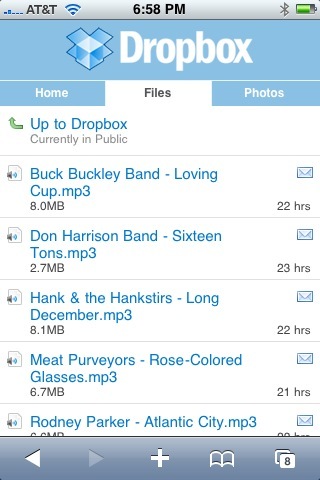
Some mighty fine music in there
ZumoDrive offers an actual iPhone app called Supersize me (iTunes link), which interestingly turned up as the only search result when I searched the App Store from my iPhone for Dropbox. Accessing files through this app is as easy and enjoyable as trying to access the files via URL was frustrating. The app is stable and fast, and my song streamed quickly.

Only one song in there so far, but it’s a good’un
Overall, I’d give both services high marks for their iPhone implementations. Maybe the slightest of edges to ZumoDrive because it is an app.
Price
You can’t truly decide between the two without comparing their prices. ZumoDrive gives you 1GB for free and Dropbox gives you 2GB for free (or stated another way, paying customers subsidize a free gigabyte or two on every desktop). Here’s how the paid plans compare:
| Dropbox | ZumoDrive | |
| 1GB | N/A | Free |
| 2GB | Free | N/A |
| 10GB | N/A | $2.99/mo. |
| 25GB | N/A | $6.99/mo. |
| 50GB | $9.99/mo. | $11.99/mo. |
| 100GB | N/A | $19.99/mo. |
| 200GB | N/A | $37.99/mo. |
| 500GB | N/A | $79.99/mo. |
At the present, Dropbox only offers the 50GB paid plan, but the FAQ says other plans will be available in the future. I’d say ZumoDrive is one good reason to hurry that up.
Dropbox is cheaper, at least for the comparable 50GB plan. If I were to go all in, I think 100GB would be my sweet spot, which is a bit of a drawback for Dropbox.
And Then Comes the Deal Stopper
It would be a tough call if the URL sharing for ZumoDrive worked as well as it does for Dropbox. But, at least as of now, it doesn’t. The jacked up way ZumoDrive handles URL sharing is a deal stopper for me. If they fix this, it would be a virtual tie: Dropbox’s lower price battling it out with ZumoDrive’s larger space options.
I’m going to watch both of these horses. When I reach my free space limit, I’ll probably jump on one of them (unless my historical preference Box.Net matches some of these plans, in which case it would have the incumbency and good customer service advantage). But for now, I’m going to enjoy my free gigabytes and watch those ponies run.

