
Nobody is going to see this since my RSS feed is dead, but what the heck. . .
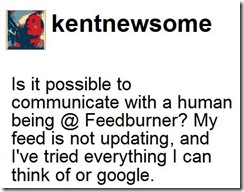 As those who have been ignoring my desperate Tweets know, my RSS feed, which is pushed through FeedBurner, has been incredibly slow for the past few weeks. Posts that used to show up in a matter of minutes have been taking 3 hours or longer to show up. All of this makes me a little like the morning paper- by the time my content gets in front of people, it’s old news. RSS needs to get closer to real time, not closer to newspaper time.
I think the delays are caused by some problem with FeedBurner. Since Google began to move publishers over to the Google hosting architecture, FeedBurner has been very unreliable. People have complained. And complained some more. At first, my results were mixed. Sometimes, my feed would update right away. Other times it took forever. After reading this promising post, I updated my Live Writer configuration to ping FeedBurner and some other services whenever I publish a new post. That worked for a while, but over time the delay got longer and longer and longer. Looking for tech support was futile. There is no discoverable path to any sort of meaningful FeedBurner support. All roads eventually dead-end at the ironically named FeedBurner Help Group, where frustrated users howl into the void.
The Montessori thing may work for little kids, but it is a cop-out when it comes to customer support.
I thought all of that was plenty horrible until last night, when my feed completely died. That’s right, it went from unbearably slow to completely dead.
After neither of last night’s wonderful posts ever showed up in my feed, I realized a frustrating problem had become a pull your hair out and bang your head against the wall sort of problem. Upon exploration, I found that the Atom.xml file automatically generated by Blogger is empty, resulting in this delightful little message:

I can’t begin to explain how much that makes my day.
Like its little brother, FeedBurner, all roads to Blogger tech support dead end at the equally ironically named Blogger Help Group. While stumbling around there, I learned that I am not the only one mourning a dead RSS feed. You would think that the Blogger folks would be all over this issue, and maybe they are, but you sure can’t tell it from the help group. Again, other than this guy, there is no evidence that anyone at Blogger is minding the store. It would take someone about 10 seconds to post that Blogger is aware of the problem and is working on it.
All of this just makes me tired and frustrated. Maybe I need to bite the bullet and pay someone to write a WordPress template to replicate what I have now (and really like) and to move my content over to that platform. I am going to email Aaron Brazzell and see what he thinks.
I know this, I have $100 of Paypal money for anyone who can get my feed working and updating in near real time without losing my existing subscribers.
There are problems we have to have and ones we don’t. Trying to revive my RSS feed and wondering if anyone at FeedBurner/Google is going to call a Code Blue is a problem I shouldn’t have.
UPDATE (3/14/09): Thanks to the awesome efforts of Chuck (one of Google’s Blog*Star experts – similar to Microsoft MVPs), I think I have a work around for this problem, at least for those of us who use FeedBurner. Here’s what I did.
First you need to figure out your Blogger blog ID. You can find it by going to the Blogger Dashboard and clicking the “New Post” button. Then look at the address bar (at the top) of your browser, and you’ll see a number:
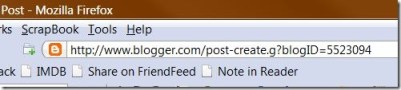
See, my blog ID is 5523094. Find yours, copy it or write it down and then go to the FeedBurner page. Click on your feed, select “Edit Feed Details” at the top left, copy or write down the existing “Original Feed” link (just in case) and then replace the “Original Feed” link with this one, changing XXXXXX to your blog ID.
http://www.blogger.com/feeds/XXXXXX/posts/default
Don’t change the Feed Title or the Feed Address information.
You will probably have to republish any blog posts that were published after the problem arose. Once I did that and refreshed my feed in Google Reader (via the button right beside the “Mark all as read” button), my lost posts showed up and, at least as far as I can tell, everything started working again. I may still have the delay problem noted above, but at least my feed is breathing again.
Hurray for Dr. Chuck!
UPDATE (3/14/09): Rick Klau of Google tells me that the issue has been fixed and is getting implemented now. This is really good news, particularly since it shows that there are smart and responsive people minding the Blogger store.
 Newsome.Org