Why Slacker Radio May Become My Music App of Choice

After seeing and ignoring references to Slacker Radio for a long time, I recently came across a pretty positive review and decided to take a look.  While I am a long-time and loyal Pandora user, I’m a big believer in multiple consumer choices.  I’m glad I decided to take the Slacker Radio plunge.  I don’t know if it will supplant Pandora as my favorite online music source, but it might.  What was once a Pandora landslide is now too close to call.

Here’s Kent’s Vinyl, my classic rock station for you to sample while you enjoy this exciting post.  Or if you prefer, my alternative country station.

Here’s what I like about Slacker Radio.  First and foremost, I like the way you create and customize a station.  You start with a single song or artist.  Like any sane person, I started my classic rock station with the Allman Brothers.  Then I added the Grateful Dead.  I really like the list of allegedly similar artists (I say allegedly because you can’t get much father from the Dead than the Eagles (see image below)) that appears on the right hand side, where you can quickly select additional artists to seed your station.

image

I also like the lack of ads and the ability to skip as many songs as you want, which features are available with the paid “Plus” subscription ($4.00 a month, paid annually).  With that plan, you’re supposed to be able to access detailed artist information and song lyrics, but I couldn’t get the lyrics feature to work in Firefox.  It worked in Internet Explorer.

The thing that keeps me running back to Pandora is the music genome thing- where the application selects songs based on the tempo, tonality, arrangement, etc. of the songs you indicate you like.  There are a lot of songs I would like out there by bands I don’t know.  Pandora does a great job of exposing me to songs I really like by bands I know little or nothing about.  I don’t know if the Slacker Radio algorithm will do as well, but so far I have been pleased by the selection.  For example, the third song that played on my classic rock station was Sea of Joy by Blind Faith- a song I love.

I also like the ability to “fine tune” your station.  By selecting the appropriate level, you can tell the app how much you’re interested in songs from other artists, how many deep cuts you want to hear and, most importantly, if you want old songs, new songs or a combination.  Since 95% of my favorite classic rock songs were recorded prior to 1978, I chose older.  Some of my favorite bands have kept on truckin’ beyond my loyalty.

image

On the downside, Slacker Radio’s web design is not particularly intuitive, in a Photobucket sort of way.  I also noticed a lot of hangs when navigating between options in Firefox.  In fact, I found the navigation to be profoundly difficult, mostly due to page freezes, accompanied by the never-ending little spinning circle (you’ll know it when you see it).  Again, I didn’t have these problems in Internet Explorer, but I’m not going to change browsers for one music app.

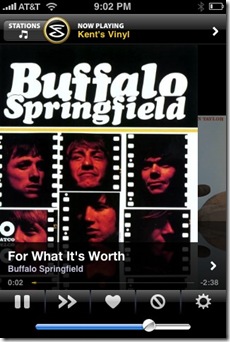
The iPhone app is excellent.  I was able to listen to my stations over wi-fi and 3G with little lag.  In fact, I connected my iPhone to the auxiliary input on the audio system in my truck and listened to my station on the way home from work.

photo

If they (or I) get this Firefox thing figured out, and if the algorithm works, Slacker Radio has a chance to supplant my beloved Pandora as my music app of choice.

What Will Office 2010 Look Like?

Here are a few early screenshots of Microsoft’s Office 2010.  Candidly, I find the whole ribbons thing to be an exercise in chaos and frustration.  But I’m not sure it would matter if they were as intuitive as dodging snowballs.

Why? Because here’s a screenshot of what I expect my Office 2010 to look like.

image

I don’t know how hard Google is chasing the corporate market, but if it has serious designs on attracting business users, it simply must implement some sort of tracked changes or version/compare feature.  The absence of that feature is the primary thing keeping me from using Google Docs as my primary word processor at home, but it is an indispensable thing for business users.

Here are a few other tweaks that would make Google Docs more attractive to me.

There should be a way to synch your iPhone calendar and contacts with the corresponding Google app without affecting- or even touching- your Exchange synchs.  I tried to synch my phone and the Google apps and ended up with multiple instances of the same contacts and events, which was a pain to sort out.  In sum, it was an unmitigated disaster.  I’m not going to risk jacking up my much more important Exchange synchs, and no big company is going to make it easy to do three-way synchs, for security/paranoia reasons.  But it would be cool to have my iPhone synch separately with Exchange and the Google apps.  It would even be acceptable to have contacts and calendar entries pushed out to the Google apps, without the ability to move data the other direction.  But all of this needs to happen without doing anything unpleasant to the Exchange synchs.

Gmail needs to finally figure out a way to suppress the “on behalf of” business when your email is read in Outlook.  I’d be happy to use the Gmail interface, but I want to use my existing email account.  I’m not willing to trust Google as the sole archive of my old emails, but MailStore Home looks like an acceptable way to archive email locally.

It would also be great if Gmail allowed folders for us dinosaurs who are more comfortable with folders than tags.  I think this is a design limitation, as opposed to a philosophical position on Google’s part, but I have no basis for that other than intuition.

Gmail should add an option to have spam deleted immediately, without ever being seen, and to have your trash folder emptied more frequently.  I’d have it emptied every day.  The best thing about Gmail is the spam filter.  I want to supercharge it and let it make all spam invisible to me all the time.  I’ve never noticed a legitimate email in my spam folder, but I don’t care if there is.  If someone wants to contact me badly enough, they’ll write again.

I also need the ability to customize the links at the top of the Google apps page.

image_3

I’m not going to use Picasa for my photos, no matter what.  I want to replace that link with a link to Flickr or Photobucket.  I also want a link to iGoogle up there, as well as links to my internet starting page and my Content Master page.  In sum, I need more flexibility to customize the page layout and content.

Finally, Google needs to take a page from Lost and pledge not to give up on Google Docs like it did on Google Notebook and various other apps.  It’s difficult to migrate to a watering hole that could dry up at any time.

I’m close to going all Google Docs all the time, but I need a little more incentive.

Pogo-plugging into a Private Cloud

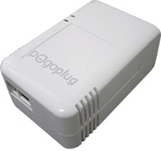
My Pogoplug came today.  I opened it about 15 minutes ago.  Here’s the skinny.

imageSetup was almost as simple as advertised.  I plugged the Pogoplug in, connected it to a network switch in my study, and got an immediate green light (that’s good).  I connected a new Seagate Free Agent hard drive, and activated my Pogoplug via the Pogoplug web site.  With a couple of minor exceptions, it was as easy as could be:

1. It was hard to read the tiny Pogoplug identification number on the attached sticker.  A quick look with a lighted magnifying glass revealed that what I thought was a letter was in fact a number (no big deal- it took maybe a minute longer to reenter the number); and

2. I had to right click and “safely remove” the hard drive from my computer after I formatted it before attaching it to my Pogoplug.  I never, ever do the safely remove thing, but the help box in the Pogoplug activation window suggested I do so (also no big deal, though it cost me an extra 10 minutes or so).

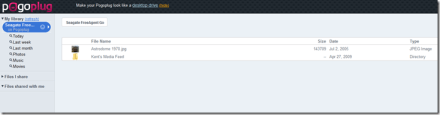
Once you get everything connected, you can log in to your private cloud via the Pogoplug web page.

The interface is perfectly acceptable, even if not perfect.

pogoplug1

The only semi-bummer is that you can’t drag items into a new folder via the web interface.  If you download the Pogoplug software (see the link at the top), your Pogoplug drive will appear in Windows Explorer, just like any other drive.

image_3

There is software for Windows and OS X and a beta version for the four people who actually use Linux for this sort of thing.  From there, you can presumably drag and drop uploads and drag items into folders.  Very nice idea, but I couldn’t get it to work.  It could be another router problem.  If so, this is getting old fast.

image

Sharing via your Pogoplug is a mixed bag.  You can share entire folders with selected people via an email authorization procedure.  A neat feature is the ability to share the contents of a folder via an RSS feed.  Here’s mine.  You can’t share items individually (only via sharing an entire folder), and you can’t generate direct links to serve media in blog posts and web pages.  At a minimum, Pogoplug needs an embeddable media player, like the elegant one at divShare.

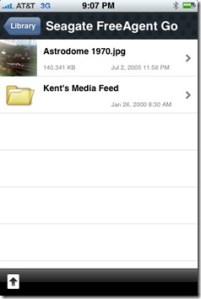
There is a free iPhone app, which installed quickly and allowed instant views of the files on my Pogoplug, over wi-fi and 3G.  I could easily access my photos and MP3s.  Uploading a photo from my iPhone to my Pogoplug was easy and fast.  I didn’t see an option for uploading anything other than a photo.

photo

Overall, I am pretty impressed with Pogoplug, and it will definitely replace my current private cloud setup.

Evening Reading: Spring Cleaning Edition

This afternoon and tonight I am beginning on my quest for a more manageable email inbox, Delicious inbox and, most importantly, Google Reader starred items list.  Here are some specifics:

1. Email: I am a terrible emailer.  Anyone who is related to me will attest to this.  So my email gets backed up for weeks.  I have emails from people I know, bands I’d love to write about and developers that wanted me to preview their now public applications sitting in my inbox.  No more.  I’m going to move things out of there from now on.  Folders or the trash can.  That’s my plan.

2. Delicious: I am not a big user of Delicious, but it is a good way to save sites I see outside of Google Reader and for other Delicious users to send me links.  If anyone- as opposed to only other Delicious users- could send me links via my Delicious inbox, I’d use the service more.  As it is, without a major overhaul I think Delicious is dying on the vine.  As such, I need to get stuff cleared out of there.  For the time being, I’ll still check my Delicious inbox.  One useful thing about the Delicious Firefox add-on is that it notifies you of new items in your Delicious inbox.

3. Google Reader: Google Reader, both natively and as a part of my Content Manager page, is a big part of my online experience.  I use starred items as my primary holding place for both things I want to read later and items I want to write about later.  I wish I liked Read It Later better, so I could move my deferred reading list there and save the starred items for writing topics.  As is, I have hundreds of starred items, and they are about to get un-starred.  Really interesting things will get added to this post for your benefit.  Everything else is going to be tossed out, and I intend to clean out my starred items list at least weekly.  We’ll see how it goes.

So here’s the stuff that made the cut.

Maybe I should use more of these.  Right now I use Windows Live Writer, and that’s it.  I think my list would be a lot different.  Or I could come up with a bunch of form emails.  On a related note, here’s someone’s list of the top 10 tools for your blog or web site.  Be careful with those iPhone site optimizers.  Many people, including me, would rather read a site in its regular format via Safari than to be forced into an alternate iPhone format.  I used Intersquash here for a while and it worked great, but I decided I didn’t want to force people into the iPhone layout.  Last and maybe not least, here are 25 blogger widgets.

Trivial Pursuit has come to the iPhone.  It was one of our favorite family games when Mom was alive.  My sister generally kicked out butts, but we kept trying.  Wheel of Fortune is also available.  So is everybody’s favorite bar game, shuffleboard.

There’s a lot of interesting stuff at Rules of Thumb.org.  For example, did you know that “a farting horse will never tire; a farting man is one to hire”?

Here’s a free way to make nice business cards at home.

Photography Aisle:  Want to take better portraits?  How about a free plug-in to make your photos look like film?  Here’s another app to help mask the crappiness of the iPhone’s camera.  Or you can stitch a few crappy iPhone photos together and make a bigger crappy photo.  Here are 10 cool to bizarre effects you can add to your photos, and here are 10 more image generators.  If you, like me, think that Photoshop is harder than writing limericks in Latin, here are some tutorials.  And some more, for watercolor effects.  And if you make it through all that and still have your senses about you, here is someone’s list of the 100 most popular Photoshop tutorials.

How about some cool magnet tricks?

If you don’t want to write a script to protect your email address from spammers, you can use ScrimHere’s mine, so protected.

Now I know why I was so underwhelmed after browbeating my mom to buy me some seamonkeys.  I was expecting them to look like the picture on the back of the comic.  Of course that disappointment was mild compared to those x-ray glasses.

PBS has a site for streaming some of its shows.  So now you don’t need a TV to watch boring shows (Ken Burns’ excellent films excepted).

I sure wish I’d had an iPhone in high school.  We had to buy the Cliff’s Notes, and sometimes they made us read books that didn’t have Cliff’s Notes.  How wrong was that?

Ron’s Evernote Tips has a regular supply of great ways to use the excellent Evernote application.

So YouTube has a new design for channels.  I’m not sure what channels are in that context.  Let me go look. . . .  OK, here’s my channel, with the paltry amount of videos I have added.  I like the fact you can edit the page from the page, sort of like My Yahoo.  I don’t like the fact that some asshole label keeps making YouTube strip the music from my little videos.  I think I’m done with YouTube until it outlives the music industry.  Maybe I should take a look at Fliggo.

Here’s a roundup of VHS to DVD converters.  I say if you have a ton of VHS tapes you want to convert, buy one of the Panasonic dual decks and if not, take the tapes to a shop and have someone do the conversion for you.

I’m finding out that I do a lot of stuff wrong on Twitter.  Another thing I do wrong is unfollow people who don’t follow me back, unless it’s a big media news source or someone really, really interesting.  Here’s an app that can help with that.  I like the way it loads over your Twitter background.

If you are a southpaw like me and two of my three kids, you might be interested in this mouse.  A C-Note is a lot for a mouse, but using a right-handed mouse is like sitting at those right-handed desks in primary school.

If you want a personal cloud, there’s the really hard way, the not quite ready for primetime way, and what looks like the very easy way.  I’ve ordered a Pogoplug and will review it when it arrives.

Recall my pet rules.  I don’t trust anyone who doesn’t like pets.  And I am scared to death of people who are obsessed with cats.  I love cats.  I just don’t base my life on mine.  I’m crazy enough on my own.

Yes, my email gets backed up.  But I don’t really think Tweetdecking it would make me more efficient.

If the new iPhone comes out this summer as rumored and hoped, I told Cassidy I’d give her my current iPhone.  What I didn’t tell her is that I would put a big heap of this on it first.  If she doesn’t like that, there’s always this.

Daily Booth makes it easy to do that picture a day thing.  I don’t know that I’d ever do that, but I think it’s a cool little app.

ReadWriteWeb does love the jargon.  Cloud agents?

jjra This may be the coolest album cover I’ve ever seen.  I can’t find any songs to sample, but you can hear snippets at Amazon.

Here’s a list of iPhone accessible news sites.  I think dedicated apps is the way to go, but if not, an iPhone friendly design is a decent alternative.

Here’s a less than impossible way to make a favicon.

I love the idea behind Songfacts, but it bums me out that one of my favorite REM songs was written as a tribute to Leonard Cohen.  Sorry, but I do not get the whole Leonard Cohen thing.  Just like I think MacArthur Park is a stupid song (though I dig Jimmy Webb), despite the arguments I hear from some of my musician buddies.

This article sheds some light on why Taj Mahal‘s publishing company is called Cheraw S.C., Inc.  I’m from Cheraw, and have always wondered about that.

Saturday Night Music

Groover’s Paradise is a great music blog.  It’s a collaborative effort by a bunch of knowledgeable music bloggers, featuring short posts around a single song.  I’ve liked just about every song they’ve featured.  Recently, they went from awesome to absolute must-read when they featured a song by the most wonderful Freddy Fender.  I liked the Texas Tornados.  And I liked Doug Sahm a lot.  But I knew about Freddy long before I’d ever heard of either his future band or his future band mate.  One of my favorite records from my teens was Freddy’s excellent Before the Next Teardrop Falls.

Here’s about the best cover you’ll ever hear of What’d I Say.  Tell me that doesn’t rock.  Seriously, if you don’t love that song, you better call 911.

One of the contributors to Groover’s Paradise is the guy from The Adios Lounge, the music blog that I have repeatedly raved about.  Another excellent music blog I discovered via Groover’s Paradise is The Rising Storm.  Any blog that dedicates posts to Mountain Bus and this fantastic record (here’s my take) is a must read.  I don’t know these dudes, but I wish I did.

John Doe (of X fame) and the Sadies have a new record of classic country covers and originals, called Country Club.

The other night organicsue, one of my favorite Blip.fm DJ’s, played a great Gretchen Peters/Tom Russell song off of their new record.  I immediately bought the record, once again proving that these social network sites are good for musicians.  The song that made me buy the record is Sweet & Shiny Eyes, but every song on the record is good.  Update:  Even though I bought the record and gave it good press, I got a take down notice from Gretchen and Tom’s record label.  No more sales or good press here, folks.

Album covers, much like science fiction book covers, can attract me to buy a record by someone I’ve never heard of.  Here’s the latest example of that.  You can hear all therfac songs on the record on Ronnie Fauss’s web site.  Or you can buy the record off iTunes like I did- before I listened to the songs.  The songs are as good as the cover.

Obviously, one of the records everyone has been waiting for is Potato Hole, Booker T. Jones‘ new record on which he is joined by The Drive-By Truckers and Neil Young.  Neil’s ever-growing political weirdness is starting to wear on me a bit, but he is still one of my all-time favorites.  And anyone who reads this blog or knows me in the real world knows how much I dig the DBT.  It’s an amazingly effective mashup of styles, with a definite DBT vibe surrounding Booker T’s organ and keyboards.  It’s an instrumental record, as should be expected.  I don’t know that I’ll sit and listen to it over and over, but it’s clearly good car music.  My favorite track so far is Warped Sister.

Rarely in my life have I discovered a musician I like some and dislike some any more than Colonel Bruce Hampton.  Cold Mountain is one of my all-time favorite songs.  Many of his records have some great stuff- I’m talking about as good as it gets, intermingled with songs I really don’t like.  Yesterday I heard Colonel Bruce do an awesome version of Skip James’ I’m So Glad.  The version I found for sale is off the Code Talkers’ 2007 record, Dee-Lux Uh-dish-un.  That song completely rocks.  I bought the record and so far, it sounds consistently good.  Really good, actually.

Shooting the Bird: More on the Blog Publishing Problem

I’m working with some good folks at Microsoft to resolve the photo publishing problem I wrote about the other day.

This is a test post from another computer, but over the same internet connection.

birdftp

There is (or is not) my little test photo.

Initially the photo would post to the Blogger photo server (which I don’t generally use), but not to my server.  I got this error:

(Publishing Error) A publishing error occurred: 200 Type okay.
227 Entering Passive Mode (xxxxxxxxxxxxxxxxxxxxxx)
150 Data connection accepted from xxxxxxxxxxxxxxxxxx; transfer starting.

So I tried to post on my laptop, using an ATT wireless card.

It worked (there is the long awaited photo).

Which means the problem is caused by my network.  Hmmm.  Let’s see if it’s my computer or my internet connection. . .

Here’s another photo- this time I’m posting on my desktop, but using the ATT wireless card.

ftperror321

This also worked, which means that the problem resides in my internet connection, not on my computer, not in Live Writer and not on my web server.

I’ve narrowed it down, but I’m not sure where to go from here.  I guess I need to look at the router settings.

When I disable my router’s firewall, the photos publish correctly.  But I obviously don’t want to permanently disable my firewall, so I need to configure my router to allow Live Writer to publish these pictures.  It’s odd that Live Writer can publish the text of the post (via Blogger) but not photos.  It’s also odd that I can publish photos via an FTP client, but not via Live Writer.

There’s a Thousand in Every Crowd

Despite the fact that it often feels like a mashup of Deepak Chopra and P.T. Barnum, I continue to enjoy Twitter.

But Twitter has a growing content problem, that if not checked will ultimately reduce Twitter to an online version of your email junk mail folder.

For starters, the volume of MLM, get rich quick and grow your follower count posts (3 versions of the same thing) is light years beyond absurd.  Add to that an endless supply of self-help posts, many of which are either nonsensical to the point of self-parody or disguised spam.  And then there’s this one dude who obsessively posts the same links day after day, which doesn’t particularly annoy me except that I can’t figure out why he does it.  If he doesn’t have an angle, he’s the most dedicated linker in the history of html.

One conclusion I have reached after spending a good amount of time on Twitter is that there are thousands of people trying to sell the same thing to each other.  MLM opportunities, get rich quick schemes, self-confidence, karma, etc.  There are vendors everywhere and, as far as I can tell, not a customer in sight.

I also wonder how potential Twitter advertisers feel about this demographic.  If everyone is selling, who is left to buy?

But among all the noise, there are many benefits.  I have seen links to interesting articles, beautiful photographs and great songs.  Most by people who, if you can believe it, aren’t trying to make money off of me or sell me some get (them) rich quick scheme.  I have also made contact with developers who have answered questions and provided assistance with respect to their applications.  In return, I try to add value and fun by posting links to interesting articles, and by posting music.  I have been doing an alphabetical survey of new wave music, via the Blip.fm/Twitter integration.  It takes time to find the music, and to add short commentary to each.  But it’s fun and I’m building a good playlist over at Blip.fm.

But maybe I am misusing Twitter by doing all that.  Maybe I should forget about content and focus on MLM and how to increase my follower count and whatnot.  Because in the midst of all of the Twitter chaos, it seems that posting music makes me a spammer.

I’ve received many positive responses to my music posts, and a grand total of two complaints.  This dude and another guy from Houston, thereby proving what I already sort of knew- that I live in a town of music haters.  Not really, but it’s interesting that anyone who has spent 5 minutes in the great Twitter flea market can get all pissy over a series of song posts, manually done, with commentary (to be fair, he later said that maybe spam wasn’t the best word to use).  He un-followed me, which is exactly what he should have done if he didn’t want to see my music posts, and this little issue was resolved.  But I think this exchange is indicative of the bigger content problem Twitter is facing.

In sum, there is a huge spam problem on Twitter, but in the words of Lynyrd Skynyrd (another annoying music reference), I ain’t the one.  Yet it seems I’m not the only one being labeled as a spammer, just because I’m not trying to game Twitter or sell people a bill of goods.

Another tech blogger who isn’t trying to make money on Twitter is Louis Gray.  It seems that the Twanalyst application, one of the many barnacles that cling to Twitter’s traffic-rich API, believes that Louis is spamming Twitter, in part because he doesn’t retweet (e.g., repost) a bunch of other people’s posts.  That is even more absurd that these muddy sticks squawking about my music.

Louis presents a logical and iron-clad defense of his Twitter philosophy:

In my opinion, begging for retweets, and retweeting is simply lazy, just like live tweeting a conference panel is lazy blogging. It’s the equivalent of forwarding e-mail, or copying and pasting someone else’s blog post to your site and adding a short link. If Twitter is truly conversational, as many argue, then repeating what someone else has said doesn’t do much to add to the conversation.

Amen, brother, although I don’t think Twitter is as conversational as we would like, or as many would have us believe.

Interestingly, Twanalyst doesn’t think I’m a spammer.  It says I am a “renowned obsessive cautious” personality with a “chatty academic” style, whatever that means.

All of this nonsense demonstrates that the rules and expectations on and about Twitter have been turned upside down.  If you blast links and mindlessly retweet posts by others, you’re viewed as adding value.  If you obsessively post about MLM, getting more followers and making money, no problem.  But if you post actual content or- God forbid- music, you are a spammer.  Or at least an annoyance.

At the beginning and end of the day, I don’t care if someone thinks I am spamming- just stop following me.  And I’m not going to unsubscribe from Louis’s blog because some application thinks he needs to change his Twitter approach.  But I think Twitter needs to develop a plan for encouraging good content.  So far it looks, at least from the outside, like Twitter is solely interested in traffic, at the expense of just about everything else.

At some point the coolness factor will fade, and Twitter will have to rely on good content.

Like music.

Frustrating Live Writer – Blogger FTP Problem

All of the sudden, when I publish a blog post with pictures in it, Live Writer is unable to transfer the pictures to my server via FTP.  When I try to do so, I get the following error.  I have a screen cap below, but Live Writer replaced the picture with the word “ftperror,” which is the name of the picture I am trying unsuccessfully to post.


      I had to upload this picture to Photobucket
and then link to it. What a pain in the ass.

I can tell by looking on my server that Live Writer is creating a directory on my server the way it is supposed to, and there is an appropriately named file in the directory, but the size of the file is 0 bytes.  I used a jpeg for the screen cap below to confirm that it’s not a png problem.  It’s not, as Live Writer replaced that screen cap with its name too.


Here lies the symptom, but what is the problem?

Sometimes the 0 Filesize is a permissions problem, so I tried changing the permissions in the target folder on my server.  No dice.  So I restored the permissions to their previous levels.

For some reason, I’m starting to think this may have something to do with the way Live Writer names the image files.

I was able to upload the files via FileZilla, my FTP application, without a problem.  This indicates that the problem resides within Live Writer.  I tried to test that theory by uploading some pictures to my Photobucket account via Live Writer.  No dice.  Same error message, but I couldn’t get any FTP client to display the proper directory on Photobucket- the connection times out when trying to retrieve the directory listing.  So I don’t know for sure.

Here’s my test picture, so I can keep trying until I figure out how to fix this nightmare.  Anyone who reads this blog knows that I think Live Writer is the most useful and feature perfect application out there.  I have become very reliant on it, so I need to fix this problem.

birds42
If you can see this image,
I have fixed the problem.

The mysterious thing is that I didn’t change any settings prior to the problem arising.  On the one hand, it’s strange that Live Writer can post blog posts, but not pictures.  But my blog posts are published to my server via Blogger, whereas the pictures are set up to post directly to my server via FTP.  I deleted all the FTP information in the Live Writer blog account settings a couple of times and reentered it.  Live Writer was able to access the directories on my server at that point.  Somehow, when it tries to transfer the picture file, something goes wrong.

This makes the formerly simple process of publishing a blog post very difficult.  It requires me to separately upload the pictures and then link to them.  It was much easier to upload the pictures at the same time I publish the blog post.  Little pain in the ass problems like this that suddenly spring up for no apparent reason drive me crazy.

But my devotion to Live Writer requires that I continue looking for a solution.  Time for a Twitter SOS.

Galveston

We spent last weekend in Galveston, celebrating Cassidy’s birthday.  It rained a lot, but we still had fun.  Several of Cassidy’s friends came down and we spent Sunday at the Schlitterbahn.

IMG_0661
Chairs

IMG_0663
Cassidy and Remy handhelding


IMG_0652
Delaney playing Light Bike on the iPhone

IMG_0658
Luke made the best of the bad weather.

Evening Reading: 4/21/09

Online Reality Show: Penelope Trunk makes a lot of excellent points about the uber myth that is blogging as a way to make a living.  People continue to confuse the software platform that we call a blog with the guy next door pounding away at the keyboard.  They are very different things, and most of the high traffic “blogs” are either old media sponsored, new big media owned or online pioneers who made a gigantic space grab while the rest of us were still trying to decipher stock quotes in the newspaper.  Meanwhile, some continue to hype the myth while one of the few who hit the blogging lottery is realizing that the best way to make a small fortune through blogging is to start with a large fortune.  All in all, it’s a case of wishful thinking overwhelming horrible odds.  Like Vegas, only not as fun to watch.

Wally Bangs Department: Wally has a flyer from Cantrell’s, one of my old Nashville hangouts.  I saw a lot of good music there back in the day.  Oh, and one night some biker chick flashed me there.  That was awesome.  Really, for those who wonder if I’m kidding.  The other best writer on the net is Will Truman.  Here’s one of the best blog posts I’ve ever read, and here’s his latest masterpiece.

Deep Art Ment: I love old album covers by obscure bands like this.  Here’s another one by the same band.  Listen to them @ YouTube.  Not bad.

What to Do with the Empty Bag: Mashable has a fun read on protecting your online identity.  So how does one becomes an “online identity expert”?  Is it an apprentice thing, like Castaneda and Juan Matus, or is there a degree in online identity?  There’s nothing as wonderful as watching “experts” fill the perceived vacuum of a new area of popular interest.  I wonder whatever happened to the hordes of Y2K experts?  I obviously agree with the personal branding idea of a central online location that connects to other websites.  Too bad the entire social media movement is designed to prevent that from happening.

Sour Grapes Department: This is going to sound whiny, but only because I am whining.  I continue to be amazed at how many “big” blogs say the same stuff I’ve already said over and over.  Yet I rarely get included in their conversations.  On the other hand, it’s mostly an equal, unequal playing field.  Very little about the blogosphere is based on merit, so most unaffiliated bloggers are in the same leaking boat, thus proving again the point Penelope makes above.  Louis Gray‘s well-deserved profile being one of the few examples where hard work alone pays off in the blogosphere.  I’d love to see him become the next self-made blogger to get hired by one of the “big” blogs.

Mac Mini Department: PC World takes another look at the Mac Mini media center.  Dave Wallace thinks this might help.  I hacked my Mac Mini as soon as I got it.  It’s a tough little computer.

Bad Java, Bad: Trying to sneak software onto computers is so nineties.

Windows Agony Prevention: Here’s how to make Windows Explorer stop treating every single folder like a video collection.  Restore the Windows Explorer columns to sanity.  This drives me crazy.

Double Edged Logic Department: A Techdirt commenter makes a very good point about the newspapers’ Google complaints.  If Google is robbing them, then they are robbing the people who actually do the newsworthy things they write about.

That’s Not Funny, Bone: Here’s everything you need to know about the funny bone.  Which runs along the runs along the humerus.  Get it?

FriendFeed Chaos: FriendFeed is simply too chaotic unless you live on it, which I don’t.  It desperately needs RSS output for filters, to allow you to output filtered content to other locations.  More than that, it needs an RSS feed that contains only the most recent one or two items that each of your friends have posted.  Until then, it’s useless to me.  It got a lot of well-deserved buzz when the beta was released, but it needs to give users a way to slice, dice and export content.

Freaky Photo of the Day: ID this interesting photo for a free subscription to Newsome.Org.

I Had No Idea: That CompuServe still existed.  CompuServe was my initial gateway to the pre-internet.  I have fond memories of the Sports Simulation forum back in the day.  I was so awesome at Front Page Sports Football.  Great career play implementation, that has still not been matched.