
This is a bummer.
Month: April 2010
5 Features that Would Make the iPad Perfect
I’m now over a week into the iPad era, and I’ve figured out how to implement it into my work flow, which, as elegant as the iPad is, takes a little work.
But I’ve made a lot of progress. My current mobile toolbox consists of my iPad, an Incase iPad Travel Kit Plus, my iPhone, a small legal pad, one ink pen, some sticky notes and some business cards.

Overall, I think it is reasonable to believe that Apple has changed the portable computer game, the way it changed the mobile phone game. For the better, and forever.
But It Can Get Better
Much like the iPhone, we can expect the iPad to get even better over time.
Here are 5 things Apple could do that would make the iPad absolutely perfect. If these things were to happen, I would almost certainly never buy another laptop. I may not anyway, but here’s how Apple can seal the deal.
1. Add a Phone
You read that right, and I am serious. Now that I’m used to the iPad, working with my iPhone is very unfulfilling. In fact, other than making and taking calls, I hardly ever do it. Why not add a phone, at least as an option, so I could pair a bluetooth headset, and not have to tote my “iPad mini” around with me?
I would happily use my iPad as a phone. I take it with me most of the time anyway.
In the absence of this feature, we can take another route, via VOIP, once the 3G iPads come out later this month. And assuming Skype eventually assembles its widely disbursed ducks, takes advantage of the gift given by ATT and allows for calls over 3G.
2. Add Two Cameras
One on the back for photo taking, and one on the front for video chat.
I think this will happen, probably in the next iPad model (not counting the forthcoming 3G version). The need for two giant batteries to ensure the all-day battery life is an obstacle to new hardware features, but technology will make all of this possible.
In the absence of this feature, developers can create workarounds. I think Camera A&B is a neat idea, but if I have to do it the hard way, I’d actually prefer a bluetooth enabled hardware solution, that lets you take higher resolution photos and videos that get wirelessly transmitted to the iPad.
Paging Eye-Fi, maybe?
3. Add an Accessible File System
The biggest hassle with the iPad is the inability to move items to and from the hard drive, and to access, manipulate and save documents. This is a massive impediment to Apple’s enterprise aspirations. iPads need a better file system.
iPads, particularly my 64 GB model, have plenty of space for document management. With the emergence of the cloud, there’s no reason iPads can’t be document masters. Heck, I can already see anything I need via the most excellent SugarSync (sign up for an account through this link and I get some additional storage space). I just can’t easily manage documents.
This is a software issue that needs to be addressed in the OS. I don’t know if Apple has plans to do so, but it should be job number 1.
In the inexplicable absence of this feature, we’ll have to hope Google Docs continues to improve, and eventually gives us the ability to edit files from the iPad. Why hasn’t this already happened?
4. Add Three More Speakers
 I almost never use headphones, but I love music. Which means I need two speakers on two sides of my iPad, so I can have stereo in both landscape and portrait modes. The sound and volume are acceptable now, so all we need is to make it come from more places.
Space, weight and price may be perceived as a problem, but some combination of technology and engineering should make this possible.
I’d pay double the current price for a more robust iPad. And it’s not like Apple is afraid to charge a lot for its hardware, right?
5. Add an SD Card Slot
I have decided I can live without a USB port, but I really want an SD card slot, to give me more storage space, and to help move documents back and forth. Of course, this requires a better file system, which may be why we don’t have it now.
Bonus Dream
And now for fantasy moment. How about tethering?
It doesn’t look like ATT is ever going to enable tethering via the iPhone (which is absurd on its face), so let’s go at it from the other direction. Apple should require that all carriers who want to sell 3G service for iPads throw tethering in the mix. Imagine an iPad with the five features described above, plus the ability to serve as a wireless hotspot for those instances where you have to use a laptop.
Five little things. Maybe six. That’s all I want.
That Fork You See Is Aiming Right at My Love (of Spectator Sports)
Well, it looks like I may have been wrong. It may happen.
Which is really a bummer. Not just for Wake Forest Basketball, but for my relationship with spectator sports in general.
 Let’s look back. When I was a kid, I was a big fan of five sports. Pro football, pro basketball, pro baseball, college football and college basketball. I knew all about the players on my favorite teams, and kept a constant eye on records and stats (none of which had dollar signs before them).
I had posters on my wall. It was good.
Then money, morals and the media killed almost all of it.
Without going into the bloody details, here’s where my spectator sports interest stood a week ago.
Pro Football: I go to maybe one Texans game a year, and watch less than that on TV. Pro football is largely about the money, the stupid player celebrations and the media. Fantasy football briefly rekindled my interest a few years ago, but when my fantasy league died last year, so did most of my interest.
Pro Basketball: I was an huge fan back in the day. From Lew Alcindor to Bill Walton (pre-Celtics) to Clyde Drexler. Then somewhere between then and now, it became a caricature of its former self. I haven’t been to a game in years, because the experience is only remotely about the basketball. It’s bad sensory overload and gives me a headache. I haven’t watched one minute of pro basketball on TV in years. It’s impossible to overstate my apathy towards the NBA.
All of this from a guy who used to play and watch hoops all the time.
Pro Baseball: As a kid, baseball was the lesser of the big three, as far as my interest went. Free agency, the fact that I was a Braves fan as a kid (I stopped liking them when I moved to Texas in 1985 and became an Astros fan) and, mostly, the lack of a salary cap turned it from a real sport to a WWF-like faux sport, and my interest waned accordingly. I still watch a handful of games a year, and pro baseball is my favorite to watch in person. So it went from last to first on my pro sports list, but as you can tell, that’s not saying much.
College Football: As a kid, college football was probably second only to pro football on my list. I watched a ton of it. I still watch a ton of it, for three reasons. One, it seems to have changed less than the others. Two, it gained a lot of the attention share I used to spend on other sports that now bore me to tears. Third, Jim Grobe. Nuff said.
College Basketball: Until the last couple of years, my interest in college basketball had remained pretty constant. It’s become a little about the money and the media (if the NCAA Tournament does expand as reported, it will kill college basketball for the true fan, but that’s a topic for another day), but it’s still fun to watch. The Tim Duncan/Randolph Childress era was the high point for me, as a Wake Forest fan. Frankly, I didn’t watch many games this past season, because I thought the Deacons were just no fun to watch.
And now comes the fork. When Wake Forest fired Dino Gaudio this week, I was hopeful that a high profile new coach, with a proven post-season record, was forthcoming. Visions of a revitalized WFU basketball program danced in my head. I was really excited, and refused to believe that this would happen. Now it looks like it will.
I’m willing to wait and see, but this doesn’t look good.
Jeff Bzdelik may be the best possible choice for Wake Forest, but other than his brief tenure at Air Force, which is a far cry from ACC basketball, nothing in his won/loss record makes that obvious.
Look, I am just a long time fan with a blog. I don’t know squat about running a university athletic department. Maybe this hire will be a stoke of sheer brilliance. But if it is, Ron Wellman must have information that Google hasn’t found.
Because nothing about this makes sense to the untrained eye.
Wake Forest has a top 10 recruiting class signed. While it should never be a deciding factor in a new hire, keeping that class intact should be a goal after the hire is made. I’m not seeing anything that would excite me if I were one of those guys. Princeton offense? Seriously? Isn’t that what Herb Sendek tried at NC State? How did that work out?
I don’t know if its about friendship. Or trying to keep the former assistants employed (that’s sweet, but shouldn’t a major factor). Or maybe Ron was infected by that LOWF thing (the idea that Wake can’t expect to successfully aim high, so we should be happy when we avoid the bottom).
Someone will say that keeping the assistants will help keep the recruits. To that I say so would a high profile hire that indicates that Wake aimed high and hit the mark. Players want to win. Good players want to win and get drafted by the NBA. Convince them that this will happen, and you could have an Aardvark roam the sidelines and they wouldn’t care.
My working theory is that it’s a combination of three things.
One, Wellman believes other higher profile candidates are unavailable or uninterested. There’s just no way on earth that WFU would fire Dino Gaudio based on wins and losses to hire Jeff Bzdelik. There is just no way. I have thought, and this is supported by the fact that Wellman is apparently on his way to Colorado to speak in person with Bzdelik for the first time about this job, that there were some informal discussions between various parties over the Final Four weekend. Or maybe not. Regardless, it means that either there was a plan in place that blew up; this is the plan; or there was no plan.
None of those make me particularly happy.
Two, the LOWF spell goes deeper than I thought, and has spread beyond the “sunshine brigade” portion of the fan base. You know, those who are fired up that we made the NCAA Tournament and actually beat the other most under-achieving team in America to make a rare trip past the first round (of course that same post-season business was the stated reason for canning Gaudio). When it was reported that Bzdelik might be the guy, the sunshine brigade was momentarily stunned into lucidity and actually began crapping all over the idea with everyone else. Slowly, however, they are regrouping and have embarked on a halfhearted effort to convince us everything is fine. It’s about 49% valiant and 51% heartbreaking to watch.
Three, for some inexplicable reason Ron’s desire to make a change was more important than the effect and results of that change. About the only way I can explain the timing and chronology of events would be if Ron wanted to make a change, right that minute, and deemed any change better than the status quo. I don’t agree with that- I’m afraid we are barreling a hundred miles an hour towards something much worse that the former status quo. But again, I’m just a guy with a blog.
As I noted the other night, I mean absolutely no disrespect to Jeff Bzdelik or Ron Wellman, but college coaches and ADs are highly paid public figures, so this sort of analysis comes with the territory.
My analysis, at least as of now, is that I’m going to have some time to fill.
I hope I’m wrong. For one reason or another.
Seesmic is Dead, Long Live Seesmic
So Twitter buys Tweetie, and some say this is another Apple-like maneuver designed to smack down third party developers and control the whole show.
Who knows what Twitter’s objective is. I’m not entirely sure Twitter knows. But I certainly don’t see this as the death knell of third party Twitter apps.
For one, choice is good. For everyone. Unless Twitter locks out third party developers, which simply will not happen, just because Twitter owns a desktop and/or mobile app doesn’t mean third party apps can’t thrive. Hell, Twitter owns Twitter already, and the whole reason we need third party apps is because the native Twitter platform- and the unenhanced experience- is so lacking.
In other words, there are enough holes in the Twitter experience to keep third party pluggers busy for a long time.
Creating
I have Tweetie on my iPhone. I used to use it, and thought it was a well made app. But lately I create most of my Twitter content in third party apps (WordPress, Live Writer, Posterous, Foursquare, etc.) and push content from there to Twitter. I can’t imagine that I’ll ever go back to creating whatever content I publish to Twitter on a dedicated Twitter web page or app.
Not to mention the very relevant fact that the Tweetie desktop app is Mac only.
Consuming
As far as reading Twitter goes, well where to start? First of all, I don’t think there are that many people who do it. What I mean by that is that tons of people cast their content onto Twitter, but other than hardcore geeks and people with skin in the game I don’t think anybody really consumes their online content at Twitter (not in the least because most information tossed into Twitter is in the form of links to content elsewhere). I think Twitter is one giant California with millions of prospectors setting up camp there in hopes of finding gold. If there is no gold, or when the gold is all taken, most of the herd will move on to the next land rush.
I’d really like to know the percentage of people who regularly read Twitter who do not regularly post to Twitter. I bet it’s a relatively small number.
To the extent that people do read Twitter, a third party app is a necessity. Multiple columns, better list handling, the list goes on and on. Again, choice is good for everyone. If Twitter is the big honking deal the Twitterati is trying to convince us it is, how in the world can you say there isn’t room for a multitude of apps and options?
Do we all drive Fords?

Seesmic Web is infinitely better than the native Twitter web site
Furthermore, many people- myself very much included- prefer web based apps. If this is the year of the cloud, why would I download a desktop app to read Twitter? This is the main reason why I prefer Seesmic. The other being an elegant, but not overdone, feature set. Very Apple like, in a good, non-evil, way.
So I’m not ready to morn Seesmic or any Twitter-dependant app. I think they’ll do fine.
At least until the gold runs out.
Antisocial Networking, Foursquare & the Binary Filter
Fellow Houston tech blogger and Houston Chronicle writer Dwight Silverman told me today that he was unfollowing me on Twitter, because he finds my Foursquare Twitter updates irritating.
No worries, Dwight. But as a student of human nature and social networking, I thought about this some while I was having lunch (after checking in on Foursquare of course).
First, some stats to put this in perspective. I have checked-in with Foursquare exactly 35 times since February 12, when I joined. That’s slightly more than once every other day. I have become Mayor of 5 locations, for a total of 40 Foursquare-related Tweets. Of my 2,871 Tweets, approximately one percent have been Foursquare related. So while there are probably plenty of reasons not to follow me on Twitter, Foursquare is not one of them.
In fact, I think Foursquare is social networking at its finest. Unlike Twitter, where people mostly toss links at each other, Foursquare actually provides the opportunity to truly network- as in see people in real life. When you check-in at a location, you can see who is already there. If that’s not networking, and this is, then I am seriously confused.
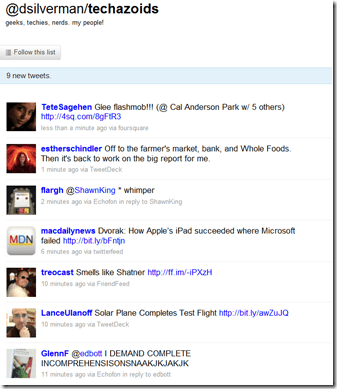
I may be kicked off this list if I mention that
I’m on my way to the Galleria Apple Store.
Other than a passing thought that maybe the relatively few Houston tech bloggers with any sort of web presence ought to stick together, I don’t care whether Dwight, or anyone else, follows me or not. By no means am I a committed Twitter writer or reader. I’m not offended- just curious.
I also understand the need to manage and filter your content stream. Farmville single-handedly caused me to become an expert on Facebook filters (Facebook, unlike Twitter, is very interactive, once you filter out all the noise).
The obvious lesson here is that Twitter needs to implement key word filters. I’m sure it will at some point. In the meantime, we all develop our own binary filters, in or out. I certainly don’t understand Dwight’s filter for Twitter streams, but that’s OK. The great thing about these services is that we can all create our own recipe for consumption. Dwight has his, I have mine, you have yours.
It’s all cool.
Not nearly as cool as becoming the Mayor of Skeeter’s, though.

Now I’m off to the Apple Store. I need to buy a cable, and see if I can oust the Mayor.
Helpful Links:
Unfollow me on Twitter here (I can’t figure out a direct unfollow link).
Add me on Foursquare
Is Wake Forest About to Jump Off a Cliff?
It’s hard sometimes to be a Wake Forest fan. You struggle to become an elite basketball program, and almost- but not quite- make it. A taste of honey and all that. Meanwhile Duke and UNC go to Final Fours the way most of us go to meals, and even win National Championships in down years.
 The one thing that makes it all bearable has been Ron Wellman, the Athletic Director. He is as much of a constant to the patient and hopeful WFU fan as Penny is to Desmond. He has shown a smart and steady hand, master-minding the resurgence (or surgence, maybe) of WFU’s football team by hiring and keeping Jim Grobe. Even the women’s basketball team made the NIT this year, which is about as likely as Hoosiers.
Earlier this week, Ron fired basketball coach Dino Gaudio, citing WFU’s consistent year-end and and post-season crash and burn. I tend to think there was more to it than that- WFU couldn’t even make the Final Four with Tim Duncan AND Randolph Childress, so whoever put a post-season curse on the Deacons did it long before Dino Gaudio even heard of Wake Forest.
Regardless, I thought it was the right move. There are hordes of WFU fans who are so beat down by years of disappointment that they have become conditioned to have low expectations for WFU sports. If we can stay in the top half of the conference, get to the Sweet Sixteen every other year or so, then we should be happy.
I have always thought that was utter hogwash. Wake can be an elite program. Apparently, Ron Wellman agrees.
Or so I thought.
When Dino was fired, we all had visions of Brad Stevens or someone similar dancing in our heads. Butler did a smart thing and signed him to a long contract (many confuse the concept of term with the concept of a buyout, but I’ll assume this extension takes him off the table, at least as far as Wake is concerned). Maybe we should change our mascot to the Stalking Horses?
Even with Brad apparently off the table, there are plenty of good prospects out there. Wake has a top 10 recruiting class signed. A high profile coach with a post season track record who promises an exciting offense and lots of fans in the seats and wins on the scoreboard could almost certainly convince all or most of the class to stay the course.
Just now, however, I read reports that Wake is just about to hire Colorado’s Jeff Bzdelik. Look, I don’t know Jeff and I’ll be the first to admit I don’t know anything about his coaching record or style other than what I have read. I mean absolutely no disrespect to Jeff, but college coaches are highly paid public figures, so this sort of analysis comes with the territory.
What I have read does not excite me. In the least.
Air Force? Fisher DeBerry is a life-long friend of mine, and I would have been stoked if Wake had hired Fisher to coach its football team (I actually begged Fisher to seek the job once). But basketball? NIT semi-final as a high-water mark? I do recall that Air Force beat Wake by something like 40 a few years ago. Maybe Jeff was the coach then, which I guess makes this a mathematical step-up. But seriously…
73-119 in the NBA?
32-57 at Colorado? The Princeton offense (hopefully that footnote is wrong)? One 4 star recruit (per Scout) in three years?
This is probably coming off as harsh, and I mean no disrespect to Ron or Jeff. But this does not sound like the roadmap to putting WFU [back] on the college basketball map. Or the way to keep a top 10 recruiting class in the fold (not that the recruiting class should be a deciding factor).
I choose not to believe this will happen, until it happens.
If it does happen, it will be soul crushing. Almost as soul crushing as watching the inevitable (and understandable) futile efforts at putting a positive spin on it.
Surely Ron is just goofing on us, right?
This is not going to happen. Sometime in the next few days I’ll come back here and tell you I told you so.
Everyone remain calm.
A Good Day for the Folders
Yesterday was a great day for those of us who like to organize our content the sane, logical way- in folders. I’ve never understood how anyone could argue while sober and somber that labels/tags are an acceptable alternative to folders. In fact, the introduction of a folder-like archive management system is what initially made Better Gmail 2 the most important add-on since French fried potatoes.
 Now, the other features of Better Gmail 2 will have to carry the banner, as Google has introduced nested labels in Gmail. Next to the fantastic spam filters, this may be the best feature in Gmail. I can’t overstate how happy I am that Google has added this feature.
Thank you, Google.
Some will feel compelled to tell me how great labels and tags are. I’ll respond the same way I always do- good, go make some labels and tags. It doesn’t have to be an either/or proposition. We should both have what we want. Now we do.
On the same day, Apple gave the world a preview of the forthcoming iPhone OS 4. There’s a lot to like about the new OS- the main thing being the ability to have more than one Microsoft Exchange email account. Another excellent new feature is the ability to place your iPhone and iPad apps in folders. This is excellent.
Folders. As far as the eye can see.
Now, if Apple would just implement folders in iTunes, I could focus all of my attention on crapping all over the otherwise excellent Evernote for refusing to add folders (or subnotebooks) to its application. Without folders, Evernote becomes unwieldy for power users. I pay for a premium account, but I won’t renew it unless the developers implement some sort of folders option.
You win a few and you lose a few. Yesterday we won.
Why Does My iPad Suddenly Take Forever to Sync?
When I set up my iPad, I was pleasantly surprised at how quickly it synced with iTunes, even though I had already purchased quite a few apps. For the next few days, synching was fast and easy, taking only a few minutes each time.
Then, suddenly and for no apparent reason, syncing started taking forever. By that I mean forever. Hours.

This is where my iPad now lives. After this message appears for 30 minutes or so, it will very slowly begin the backup process, after which things will move along at the pace of frozen molasses.
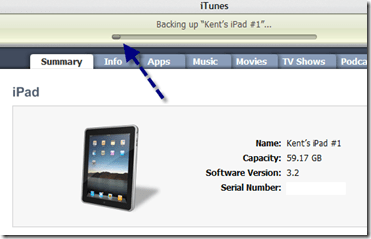
It takes hours for the backup process to be completed,
once it finally starts.
Why? Why, I say! I can think of no reason why it suddenly takes hours to sync my iPad.
Very frustrating.
A Business User’s Toolbox for the iPad
This is Part 1 of a continuing series.
 As I noted on iPaday, one of the things I am focusing on is the best and most efficient way to insert my iPad into my work flow. As a full fledged member of the rat race, who works in a corporate environment run on Microsoft Office and Exchange, this is not the easiest thing to do.
A Brief Rant
Let me get a major gripe out of the way and then we’ll move on. Apple, seriously, there’s no good reason why our documents have to be kidnapped from the bowels of our iPads by third party apps. The iPad is plenty powerful enough to support some sort of file system that allows us to access, manipulate and save documents directly. If for some incomprehensible reason this is not the case, then give me 8 hours of battery life instead on 10. Or 6. The other 2-4 hours are wasted trying to get around these needless limitations anyway.
iPads need a vastly improved system for managing documents.
Apple claims to seek acceptance in the corporate arena, but unless document management becomes a lot easier, it simply will not happen. This, along with the absence of a camera or two, is the best hope for the forthcoming HP Slate.
But since Apple makes it hard, let’s do it the hard way.
Email via Exchange works great on the iPad, right out of the box. I, for one, am really glad Apple did not implement the universal inbox. Those of us with real jobs don’t want to blend our work and personal email. If Apple does implement a universal inbox, I deeply hope it does so as an option only.
Receiving corporate email on an iPad, even with attachments, is easy and pleasing. Sending email with attachments is needlessly burdensome, however, since there is no way to attach a document from within the email application. You have to start from within Pages or whatever app holds the attachment you want to send. Again, why?
Document Management
Once you get an email with a Word document attached, it’s a little awkward, but manageable, to open the attachment in Pages, edit it, and then export it as a Word document and email it back. Tracked changes do not appear on the imported document, and there is no similar feature in Pages. Apple really needs to figure out a way to view and create tracked changes (or the equivalent) in order to ensure that corporate users think of the iPad as more Word-like and less Google Docs (ugh) like.
Accessing documents is a common annoyance on the iPad. There is no sane way to move documents to and from your iPad, so you have to patch together a group of apps to end-run around Apple’s insanity.
Here are the ones I’m using, which taken together, work pretty well.
Windows on an iPad?
The first app in my arsenal is Desktop Connect. It is an elegant and easy to configure app that allows you to access and use your Windows desktop via your iPad.

See Live Writer, right there on my iPad. Cool, huh?
Desktop Connect is surprisingly snappy and very useable. One way I have used it is to view Word documents with tracked changes, by opening Word and then the document I want to review.
Seeding and Seeing the Cloud
While Desktop Connect is handy for running desktop apps and viewing documents that reside on your desktop, it it not a solution for moving documents between your desktop, the cloud and your iPad.
The next app I rely on, for both document access and general backup, is SugarSync. I’ve been pretty carefree about backing up my data, and so I decided to solve two problems with one good app. I now have most of my documents, photos and MP3s backed up to SugarSync, which seems to have the best price ($150 a year for 100 GB; $250 a year for 250 GB) and the best iPad app.
Via the SugarSync iPad app, I can access, view and manage my files on my iPad. The access part works perfectly. To get a document from SugarSync onto your iPad requires that you email it to yourself (again there is no reason it has to be that hard). You can email documents natively from within the SugarSync app, however, so this is not quite as burdensome as it sounds.

Here’s the way a folder looks in the SugarSync app. Very nicely done
Document Retrieval
For retrieving documents from my email accounts and my Dropbox and Google Docs accounts, I use GoodReader, which is a very useful app and one of the few, at a very reasonable 99 cents, that isn’t overpriced.
You can easily configure GoodReader to connect to your various accounts, as well as to your desktop via WiFi, after which it is simple to move documents to your iPad, as needed. Getting them back is another unnecessarily roundabout journey. Essentially you have to email the revised document to yourself and then get it back to its original location from there.

See how nicely GoodReader shows the attachments to emails in my Gmail inbox? Downloading them to my iPad is a one-click process.
Paging all Tech Gurus
GoodReader is preconfigured to work with many email and cloud services, including Dropbox, Mobile.me and Box.net. I have not yet figured out, but badly need to know, how to configure GoodReader to connect with and access my SugarSync files. Anybody want to help a brother with this?
Virtual Flash Drive
Finally, I use Air Sharing HD as a alternate way to move files to and from my desktop. Ultimately, I may resort to a single app for this and cloud access, but for now I’m still experimenting like a Freshman at college.

Here’s the way my iPad looks in Windows Explorer via Air Sharing HD. It’s simple to drag files back and forth.
Conclusion
It’s a patchwork solution to a problem that, frankly, shouldn’t exist. But these are some well designed apps, that make the iPad much more useful in a business environment.
I’ll have more later. In the meantime, what other apps and advice do you have for the business user?
NetNewsWire: an iPad Savior?
I’m now well into my 3rd day as an active iPad user. Overall, the experience has been very positive, but there have been a few challenges.
The first and most important has been finding a rock solid and reliable RSS feed reader. I use and very much like Google Reader for my desktop RSS feed reader. In fact, because the large, large majority of my online content is accessed and managed via my feed reader, it is fair to say that Google Reader is my online control center.
But I do not like the way Google Reader- the regular or the mobile version- works on the iPad. I don’t know the cause (and I don’t really care), but the pages just don’t display and refresh as crisply as they do on a desktop. All of this sent me into a state of panic, given that an iPad without an elegant RSS feed reader would be of very little use to me.
So I did what any good nerd should do- I sent out an SOS via Twitter.
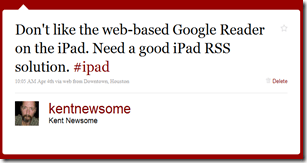
Lots of my friends immediately suggested NetNewsWire. I’ve been hearing my buddy Dave rave about this Mac-only program for a long time, so I decided to fork over $10 and give it a try.
It was instantaneously clear to me that NetNewsWire is a vast improvement over Google Reader on the iPad. And since it (supposedly, but see below) syncs with Google Reader, it became not only my default RSS feed reader on my iPad, but also my most used app.
Here’s what I like about it, and some things that I really don’t like.
I Like:
1. The layout and feel of the app is superb. I love the way my Google Reader folders appear and expand. It just feels natural and intuitive.

2. I love the way I can click on a feed link and the web page loads right there in the app (this is the only thing keeping idiotic partial feeds in my reading list). It’s a better implemented version of the “Preview” feature that Better GReader adds to Google Reader. Why doesn’t Google add this stuff the the native app? Thank goodness for Gina Trapani, but why does she have to come along and organize Google’s apps?
3. I like the way the app handles sharing. Click an icon and you can immediately email, send to Twitter or save to Instapaper (but see item D below).
I Want the Developer to Fix:
A. The Google Reader Sync doesn’t work very well. I compared Google Reader on my desktop and NetNewsWire on my iPad, side by side. The sync wasn’t just delayed, it seemed sort of random. Refreshing the feeds didn’t help. This needs to be fixed.
B. Why do read items and starred items appear in the list along with unread items? I really, really don’t like this. There should be an option to display only unread items. For that matter, are there any options at all? I couldn’t find a settings (or the equivalent) menu.

The blue dots are the unread items. Read and starred items are also displayed. Why?
C. I don’t like having to confirm that I want to mark an entire list as read. Why isn’t there an option to mark items as read immediately, without the confirmation? This isn’t a huge deal, but it would make my reading go faster, and fast is good.

D. I wish the sharing feature allowed sharing at more locations. Even more, I wish I could configure a standard intro before the shared item, the way I add “Interesting:” before items I share via Google Reader.
E. Finally, I wish I could select my URL shortener. TinyURL works fine, but I use Bit.ly for everything else, and would rather be consistent. I don’t live and die by Bit.ly’s stat tracking features, but I have gotten used to them.
Overall, I like NetNewsWire. In fact, it largely saved the iPad experience for me. It may even overtake Things as the Mac-only app I’d most like to use on my Windows computers.
But it could be better, and for $10 I expect the developers to get right on it.
 Newsome.Org