
When I set up my iPad, I was pleasantly surprised at how quickly it synced with iTunes, even though I had already purchased quite a few apps. For the next few days, synching was fast and easy, taking only a few minutes each time.
Then, suddenly and for no apparent reason, syncing started taking forever. By that I mean forever. Hours.

This is where my iPad now lives. After this message appears for 30 minutes or so, it will very slowly begin the backup process, after which things will move along at the pace of frozen molasses.
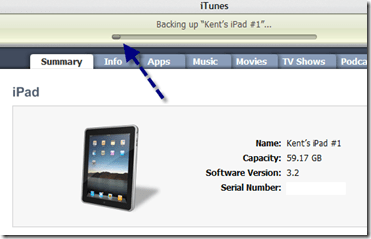
It takes hours for the backup process to be completed,
once it finally starts.
Why? Why, I say! I can think of no reason why it suddenly takes hours to sync my iPad.
Very frustrating.
 Newsome.Org
I'm having the exact same issue. It's really bugging me – forcing me to leave it at home while it finishes and I run out…defeating the purpose of the device!
Mine has been backing up for 10 hours and not even halfway there!! I am very frustrated. It may take 24 hours to do this. That's ridiculous!!!
Yup, this sucks. My ipad takes forever too.
I have taken to canceling the sync and closing iTunes. Then I restart the sync. It works SOMEtimes…WTF?
Same problem here. Everything iTunes does (on windows 7) takes ridiculously long for me, but ipad and iphone syncs especially are just flat out insane. It defeats the purpose of having a backup, when no one has time to actually finish one!!Even if it's backing up every single kilobyte of my 64gb ipad, it still shouldn't take anywhere near this long. I can copy 16gb (roughly) to my flash drive in a fraction of the time.
Same problem here. Everything iTunes does (on windows 7) takes ridiculously long for me, but ipad and iphone syncs especially are just flat out insane. It defeats the purpose of having a backup, when no one has time to actually finish one!!Even if it's backing up every single kilobyte of my 64gb ipad, it still shouldn't take anywhere near this long. I can copy 16gb (roughly) to my flash drive in a fraction of the time.
Kent:There is a free software program called “Backoff” that allows you to turn off the automatic back up with your iPad (and iPhone or iPod too). You can still sync your iPad manually by clicking on the device once it shows up in iTunes and then going to the tab that shows the different things that can be synced. You can download the program at: http://www.digidna.net/products/backoff I just did it and it worked great .. it actually brings up a dialoge box that allows you to turn off and on the iPad automatic backup. Just remember too do a full backup from time to time also. To manually do a full back up .. go to this URL and follow the instructions: http://www.digidna.net/products/backoff/user-gu… Hope this helps .. it sure helped me.WldHogn
I'm having the same issue. It backed up the first few days very quickly, then suddenly started going about a pixel every 30 – 60 seconds. I restored the iPad and it was once again backing up very quickly … and once again, within a few days it was slower than hell. The worst part is that not for a split second does my laptop stop having disk activity. iTunes is actually working the laptop, but not doing what it should be doing…
thanks! worked like a charm.
OMG….this worked. I am forever grateful for you posting this information. Thank you, thank you.
The BackOff solution works great! Thank you!
I have identical problem too! Very annoying.
I have the exact same problem with my iPad as well. My iPod touch backs up in a matter of a couple of seconds but when I updated my iPad for the first time last week because of a firmware upgrade it took 4 hours of which 2 hours was backing up the iPad. What I do is when it's backing up at the top of the computer screen where it shows the status bar that barely moves, just click the “x”. This will cancel the back up process but will still sync the ipad. Same goes for the iPod because I had this problem about a year ago with my iPod touch. For some reason now it only takes a few seconds to back up my ipod.
I have done a soft reset and it sill takes hours. Need to start in the early AM so done by lunch. Dumb.
Mine is taking about 10 hours to backup. This is ridiculous. Called Apple tech support and they were no help.
This works like a charm. Nice link and a great program.Thank you!
Got the save problem.Just found this site:http://www.theipadguru.com/2010/05/19/tip-of-th…Will give it a try to see if it's worked.
hi,i have a problem here,can some1 help me solve it out?thx
i reset my ipad, but then the screen only showed up the apple logo and nothing else…what can i do?
I am forever indebted. Thank you.
My iPad backup went wonky after I helped a friend set up his iPad using my iTunes.
I fixed my problem by going to Edit > Preferences > Devices (in Win 7) and deleting the backups from the friend’s iPad. Mine worked find after that.
I’m experiencing the same problem right now as I speak. Two hours is what I’m going on, hope it doesn’t get much worse.
You are a star! Thanks so much for this advice.
Maybe disabling the auto-backup will solve some of the frustration. But indeed, backing up 64 GB iPad seems to feel too long.
http://www.nyakhar.com/2010/07/disabling-itunes-automatic-backup-for-the-ipad-iphone/
Excellent post. Thanks for sharing, worked great!!!
You can just click the x in the process box while it is backing up. The device will stop backing up and start syncing.
I just did that and it did not help me at all.
Mine is like 8 hours!! I have 24 apps on it!
All you guys have to do is click the X where you see the message.. & It will cancel the Back Up.
Million thanks! It did work!
Perfecto!!
Prefect Wldhogn!!
same problem here. makes me want to punch some freaking apple engineer in the throat.
I fixed my issue by downloading Backoff by Digidna.com. I then updated my Ipad system and went back to back up manually. It seems to work fine now. I’m sure it is corrupt 3.2 thing. I have never had the backup work right until I updated to 4.2 with the help of Backoff.
my ipad doesnt even sync :((
Me too and I can’t find an answer anywhere as to the cause.
I have the same issue, only recently, i have been fortunate enough to by the sounds of it that it has not happened earlier! Anyway although cancelling the backup sync is an option, it really is not a fix, it only stops the back up, which of course is important and needs to be done, (at least every so often), so please someone **Apple** fix this problem, why would i purchase a machine that i can not use it as it was meant to be used!
Mate, you have saved my inclination to smash my ipad, you are a legend… thanks very much!!!
I just upgraded my ipad to 4.2.1. I got good news, my backup used to take 24+ hours to finish now only took about 3 mins. I checked the backup files and Apple now used the iphone type to do the backup, not the other mdinfo type. So Apple did realize they did something wrong and correct it.
BackOff works great, but still doesn’t solve the backup problem. I’m doing a backup now, first time in a month, and it’s already running 12 hours with no sign of ending soon. I wish I understood the logic why this would be even possible?
OMG OMG OMG OMG best app ever!
I am on 36 hours….. I want to upgrade to 4.2 but do not want to loose the apps I bought…
im having the same problem did you find out anything or how to make the ipad sync go faster????
Same problem here but I find that it sorts itself out if I do two or three re-starts of the iPad.
Always work to the maxim – “Have you tried switching it off and on again?”
(Apologies to G Linehan and “The IT Croud”)
finally fixed mine.
used Backoff to skip the backup.
http://www.digidna.net/products/backoff
Completed the remaining steps of the SYNC 2-4
This then allowd my to update to latest OS. prior to this it would not let me update to the latest version of the OS as it always forced a backup first.
Previously backup never finished now 3 minutes:-)
Perfect – and it works!
well that happened to me i left it on over night and well it worked but apple really need to sort it out. But If you dont back up reguarly you will find it takes longer
Mine has been backing up for 4 hours today and not even a 1/4 way there. I have to get this update because some of my apps won’t work without it. I’m praying it completes before my flight in the morning. Have you found out what the issue is? HELP!!
I never had this problem until I upgraded to 4.3.3 today. I’m adding some movie files to VLC media player so I’m not bored to tears while my car gets fixed tomorrow. iTunes has been “syncing” for over 20 minutes. When I tried to go into preferences, the damned program froze on me! I don’t dare pull the plug, because I have a bad feeling that I’m going to corrupt everything on the iPad and it’s going to brick on me.
Find your iTunes folder and copy and paste your apps folder elsewhere. You can import them after update if you have too, but normally you shouldn’t lose anything with an update. Also you can view them as a list and take note, should you need to manually download and install them again.
wrong
Hey….did u try umm….i dont no……SYNC BEFORE U GO TO BED EVERYDAY !!! duhhhhhhhhhhhhhhhhhhhhhhhhhhhhhhhhh
Hey….did u try umm….i dont no……SYNC BEFORE U GO TO BED EVERYDAY !!! duhhhhhhhhhhhhhhhhhhhhhhhhhhhhhhhhh
Wow man, that’s helpful and really explains how even though it used to work smoothly and in minutes, suddenly takes hours. Don’t even bother looking for a solution, just adjust your lifestyle so that you never have to sync before bedtime! Brilliant!
thank you!!! that helped my ipad.. I was starting to get very frustrated and apple support was no help at all!
Same problem here.
Two hours is what I’m going on, hope it doesn’t get much worse.
Hey idiot that doesn’t help, that’s not the question
I also face this problem. this is really disturbing.
I’ve done that and I’ll wake up w/ some stupid error and never finished anyway.