Here’s a short film I put together to get the kids excited about sleeping in the cabin.

Here’s a short film I put together to get the kids excited about sleeping in the cabin.
And their friends.
Want to make a really cool video in about 10 seconds (of your time)?
Go to Pummelvision, point the app to your photos, and give it access. A few minutes or hours later (depending on the number of photos involved, you get something like this. . .
My Pummelvision from Kent Newsome on Vimeo.
It will even upload it automatically to Vimeo or YouTube.
That is pretty darn cool.
Here’s a very interesting and somewhat creepy video tour of Six Flags New Orleans. It closed as Hurricane Katrina approached. And never reopened.
There’s a fine horror movie waiting to be made there.
I, along with many others, constantly rave about Windows Live Writer. It is probably my favorite current application. I could easily give another sermon about it.
But not tonight. Rather, I’m going to talk about Live Writer’s often-overlooked Microsoft Live Essentials suitemate: Windows Live Movie Maker. It’s free, it’s relatively powerful, and it makes great videos.
I use it mostly for creating slideshows- a series of photos set to music. Here’s how I made a pretty cool little video of some old photos of my parents and some of their friends. In less than 10 minutes.
Step 1: Drag and Drop Photos
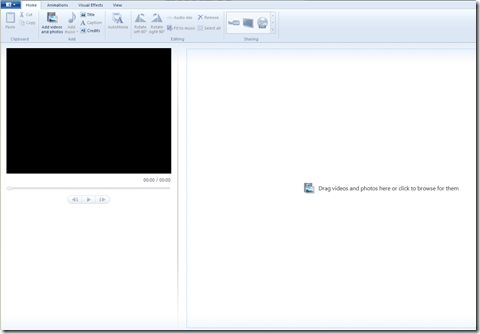
Open the application, click on the “Add videos and photos” button and drag and drop photos into the space on the right. I grabbed photos from a folder in my Pictures Library called Old Prints.

Step 2: Add Music
Next, click on the “Add music” button, navigate to an MP3 you want to use and click on it. I chose one of my favorite songs, Valse de Grand Pere, by the Bluerunners, from their excellent LP Honey Slides (purchase @ Amazon; Lala link). The green band above the photos tells you there is audio associated with the movie project.
You’ll want to pick a song with a length consistent with the duration you want for each photograph. For example, if you have 50 photos and you want each photo to be on-screen for 5 seconds, you’ll want a song that lasts around 4:10 (50×5=250; 250 seconds=4:10).
Step 3: Fit to Music
Next, click on the “Fit to music” button, which will automatically configure your movie length to equal the length of the song you added.
Step 4: Make Your Movie, Automatically
Next, click on the “AutoMovie” button, which will immediately and automatically add a title, cross-fade transitions between photos, and pan and zoom effects.
Step 5: Customize Your Titles
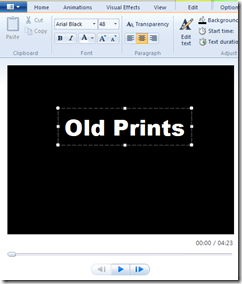
Click on the first and last slides, and replace the default text with the text of your choice. You can add nifty text effects via the “Text Tools” tab.
Step 6: Choose Your Format
From the “Home” window, select your format via the “Sharing” box at the top. I wanted an HD movie, so I clicked on the TV icon (which is the HD option), named my video file and, presto, an HD Windows media file is quickly rendered.
There is also an option to upload directly to YouTube or to burn a DVD.
Step 7: Upload and Enjoy
That’s all there is to it. Not a bad way to spend 10 minutes.
First of all, the best music blog in all of the universes, known or unknown, express or implied, is A Truer Sound.
Now that we have that settled, let me give you an example of why. I know a lot about music. Really, I do. So when I first hear a band that blows me away, that’s a rare and special thing. Well, guess what showed up in my feed reader tonight? This absolutely excellent, hilarious and highly recommended video by a band called D. Striker.
Not only am I considering basing the rest of my life (or at least the rest of my night) on this excellent video (which supplanted Four Wal-Marts by my buddy Baker Maultsby as my all-time favorite Walmart song)
I can also report that you can download an entire album of wonderfully named songs via D. Striker’s web site, on a name your own price basis (Not Funny Anymore, Last Resort, Broken Strings Again and Comfort Inn being excellent songs). I’m too currency-challenged to pay much, but to make amends for my economic shortcomings, I’m going to Tweet my new Twitter pal Bill and ask him to buy a copy for a million or two bucks (preferably a million). I say a computer on every desk and D. Striker on every Zune. Wait a minute. . . does Steve Jobs use Twitter? Just kidding Bill. We love our Zunes. All ten of us do.
D. Striker is absolutely worth a listen or ten. For their next record, I’d love to hear them rock-up a cover of Sandra Lynn’s Blues by South Filthy (hint, hint).
You can follow D. Striker at Twitter. And you should.
We spent a lot of time outdoors over the Christmas holidays, including a couple of sporting clays outings with our friends the Cheneys and the Fenrichs. Carolyn Cheney is an excellent photographer, and took some great pictures of Cassidy and me. I combined them with a great song by my favorite band into a little video.
Photos of Cassidy and me by Carolyn Cheney
“Let the Lead Fly” by The Wrinkle Neck Mules (buy the excellent record at Amazon)
Delaney became Amelia Earhart for her school’s Great Moments in History project.
Delaney is such a talented little person. I am really proud of her.
More about Amelia Earhart at Wikipedia.
A bit of trivia: Amelia Earhart was the first woman to receive the Distinguished Flying Cross. Delaney’s grandfather (my dad) received the DFC during World War II.
I am really happy to live in a world where this is possible.
After shooting Volume 1 and Volume 2 from a behind the shooter, stationary camera, I shot this round with a gun mounted camera. It works OK with high, arching shots where there is a lot of blue sky to provide contrast. It works less well on low, fast shots, where bushes or trees are in the background. I also learned on editing that I need to start shooting only after I have loaded and am ready to shoot. This video is pretty sloppy, but it taught me what I need to know for future videos.
It would also be really, really helpful to have a remote control for my JVC GC-FM1A HD camcorder. That would allow me to easily stop and start between shots while reloading.
I shot OK today, particularly considering that the pull delay wasn’t working on several of the stations and I was shooting alone. But I still gave away too many easy points. I should be hitting at least 85% on the south course.
It’s been slow going on the videos, but I’m getting there.
 Newsome.Org